
Tracking Relationships Using Zoho CRM's Connected Records

05/04/2026 07:16 AM - By Candice DeRiso

Connected Records in Zoho CRM

Breaking Down Silos: How Connected Records Unify Sales and Operations for Smarter, Automated Customer Insights

In rapidly growing companies, a common challenge is the lack of collaboration between departments such as Sales and Operations. This often leads to information silos and redundant manual data input across multiple platforms and in different formats. Even the best development teams cannot magically connect these separate systems. 


However, Connected Records within Zoho CRM offer a versatile solution to address this issue.  


When your organization begins using Connected Records, it enables seamless linking between CRM modules—such as connecting the Deals module to a custom module like Onboarding. This provides a more unified and comprehensive view of the customer experience. Unlike fixed Lookup fields, Connected Records are dynamic and they support the complex many-to-many connections within your business. In addition, these records can be automated through workflows.


Let's dive into the details of CRM relationships using Connected Records...

Connected Records vs. Lookup Fields

Seamless Integration, Smart Automation, and Secure Visibility 

Zoho CRM's Connected Records provide flexible, dynamic connections between modules without the need for complex administrative setup. Through Workflow Rules, they enable automation—such as automatically creating a Connected Record when moving from "Deal Closed" to "Project Record." Team members can access public fields from the parent module without full organizational access, enhancing data security and clarity.

  • Flexibility: Connected Records can link modules on the fly without complex admin-level structural changes.

  • Automation: Use Workflow Rules to automatically trigger the creation of a "Connected Record" when a specific stage is reached (e.g., Deal Closed → Create Project Record).

  • Visibility: Team members can see public fields from the parent module without needing full access to the Org module, maintaining data security and clarity.
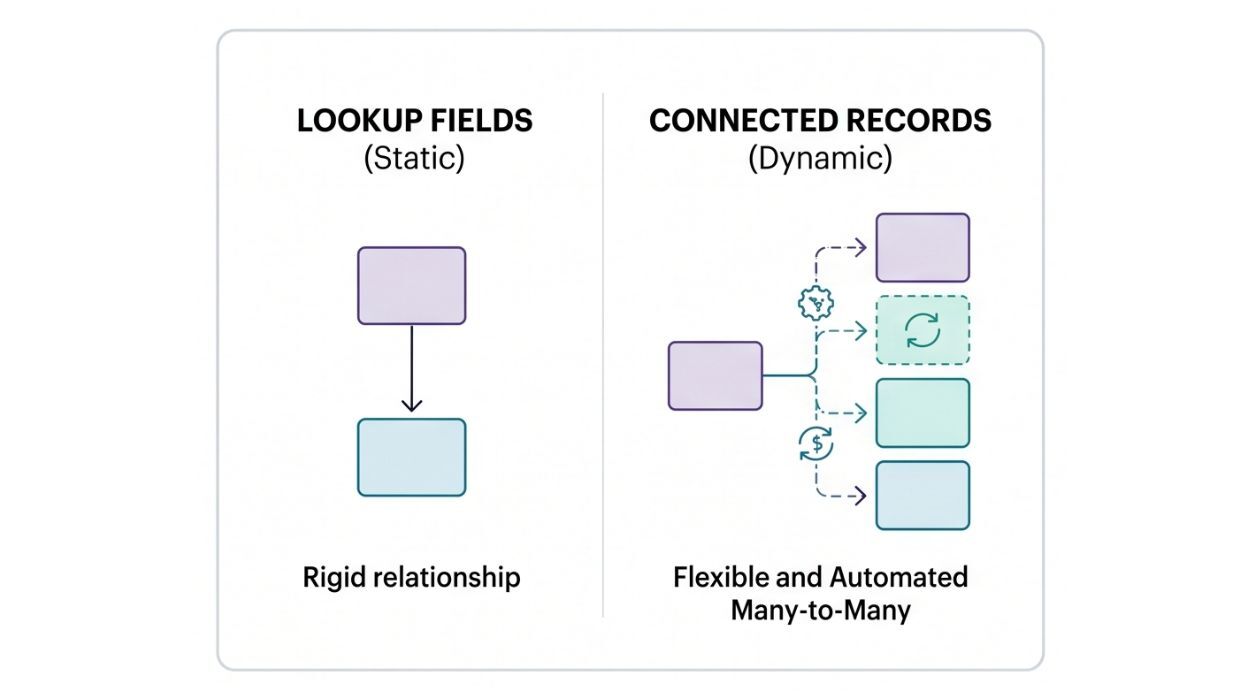
Lookup Fields Vs Connected Records

Industry Use-Cases for Connected Records

Construction & Engineering

Construction and Engineering

The Scenario: The sales rep has received a "Signed Contract" for a new project. Now he or she needs to move on to "Site Preparation."

The Connections: Linking the Deal (Org Module) with a Site Inspection (Team Module).

How it Works: When a Deal reaches the Stage of Agreement Signed, a connected workflow automatically creates a Connected Record in the Site Inspection team module. Fields from the Deal record are mapped into the new Site Inspection record so that none of the details are lost. 

The Inspections team is notified of the new project, and they can see project specs. Meanwhile, the Sales team stays updated on the inspection status without leaving the CRM so they can send a follow-up "thank you" message when the project is complete. 

Key Benefit: This approach eliminates "lost" site visit notes and ensures that the Inspections team has the exact scope sold by the Sales team.

Real Estate & Property Management

Real Estate

The Scenario: When a Property is under contract, the management of "Property Sale & Paperwork" must be managed and payments are made. 

The Connection: Link Deals and Contacts (Org Modules) to Property and Contracts (Team Modules).

How it Works: Once a Deal reaches the Stage of Under Contract, the Property record is already linked with the Deal so it is updated to "Under Contract" and a Connected Record is created in the Contracts module. A notification is sent to the Finance team to prepare the Contract based on the details in the Contract record. 

Key Benefit: Using multiple Connected Records (both the Property and the Contract) provides a clarity and seamless "handover" from the Agent to the Operations and Finance team.

Finance & Wealth Management

Finance and Insurance

The Scenario: Moving from an Annuity Deal to Suitability Review & Policy Issuance.

The Connection: Link the Deals (Org Module) to a Fulfillment & Compliance (Team Module).

How it Works: Once a Deal reaches the "Application Submitted" stage, a Workflow Rule automatically creates a Connected Record in the Fulfillment Team Module.  Compliance officers are notified. They use the Connected Record to review the annuity's "Suitability Form." They can see the client's age and risk tolerance directly from the Deal without full access to the agent’s private notes. Then the Fulfillment team updates the Connected Record as "Funds Received from Carrier," which instantly updates the status on the Agent’s Unified View.

Key Benefit: Agents can focus on the next sale while having real-time visibility into whether a client's annuity has been funded or if it's stuck in "NIGO" (Not In Good Order) status.

Best Practices for Implementation of Connected Records and Workflows

To begin with Zoho CRM's Connected Records and Workflows, identify the departments or team who are "out of the loop" or disconnected from the rest of the team. Historically, only the sales team has used CRM and connected records, but this method now encourages the entire team to collaborate in a unified space for managing relationships and tasks.

Identify the processes leading to delays, determine the critical data points shared between teams, and find where these points overlap—this overlap will serve as the connection point between different modules.

Follow these key best practices throughout the process: 

  • Automate workflows with picklist triggers such as "Closed Won" or "Status Update" to avoid manual setup. 
  • Display only the public fields pertinent to each team’s role to reduce unnecessary data. 
  • Use Connected Records to manage cross-departmental requests—such as a sales rep asking for a product demo from pre-sales. 
  • Clearly define the handoff point when a process moves from one team to the other. 
Connected Records transform Zoho CRM from a simple database into a collaborative workspace. We recommend reviewing the points where departments hand off tasks and identifying the exchanges where you can replace an email or chat conversations with a Connected Record. If you're feeling overwhelmed trying to do this alone but believe your team needs it, don’t hesitate to reach out—we’re happy to walk you through the process.